Your chat transparent over your game, or on one clean panel: the roles in colour, no frame around it. Type your channel, play with the preview, copy the link. Nothing to install, no account.
Drag the round handles: width 100%, height 100%Background opacity 0% leaves only the text, 60% is a rounded glass panel, 100% is solid.About 7 lines fit at this text size.
Chat what shows up, what stays out
Hides each message that many seconds after it arrived, so the chat
disappears between messages.
sec0 keeps messages until they scroll off.
Third-party emotes
Each service loads your channel's emotes and its global set. Off, its
codes (like monkaS) stay plain text.
Kick channels only have 7TV. For YouTube, Streamer.bot brings the emotes along.
Twitch's, Kick's and YouTube's own emotes always work.
Raids
A raid (on Kick: a host) shows a Raid Warning line with the name and
the count, and the panel's edge lights up once.
Raids under the number are skipped: 5 keeps one-viewer raids out,
1 shows all. Untick it if you already run a raid alert.
Subscriptions
New, gifted and renewed subs show as guild lines: a new sub joins the
guild, a renewal comes online.
A gift names every recipient, one joining after another.
Messages from these names are never shown: your own bot, a second
account, anyone. Separate names with commas, up to 20. The line
under the field shows what the link will hide.
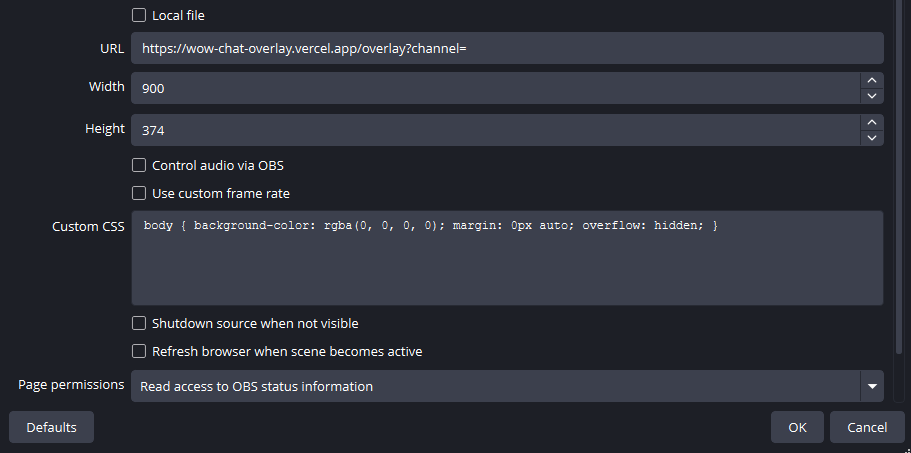
Paste the link into URL. Downloaded the file instead? Tick Local file
and pick it.
Set Width to 900 and Height to 360.
OK, then drag the overlay where you want it. Too big? Drag a corner
inwards; scaling down stays sharp, scaling up goes soft.
Only URL, Width and Height need touching. Your numbers are the ones above.
Chat coloursroles as chat channels
Someone using /meEmote
Someone raids you[Raid Warning]
A new, gifted or Prime subhas joined the guild.
A renewed subhas come online.
The channels and their colours are the WoW overlay's, so a role means the same
colour in both. Each line names its channel in brackets, as in the game; Say needs
none. Pick another channel and the preview follows; with several roles, the first
match from the top wins. Raids and subs are events, not roles, and keep their colours.
Class colours, the switch under the preview, tints the name by WoW class from
the chatter's own name colour. The line keeps its channel colour.
Say hi
I make this overlay in my spare time. It runs inside other people's OBS, so I
don't always see when something goes wrong. If something doesn't work, or you
miss something, send me a message.
 Support me on Ko-fi