WoW Chat Overlay Twitch, Kick & YouTube OBS browser source
Your chat in the World of Warcraft look.
Type your channel, copy the link, paste it into OBS. Nothing to install and nothing to log in to.
- Your chat speaks WoW. See the chat colours
- Twitch, Kick and YouTube in one chat window. YouTube comes through Streamer.bot on your PC.
- Free, no account. Every setting lives in the link itself.
Set up your overlay
Three short steps. The preview and your link follow along as you go.
1Your channel
Twitch and Kick need only your channel name; YouTube needs Streamer.bot on your streaming PC.
The name from your channel address: twitch.tv/thisname
The name from your channel address: kick.com/thisname
YouTube does not let a web page read its chat. Streamer.bot, a free program on your streaming PC, reads it with your own Google login and hands it to the overlay on the same machine. Nothing about your account reaches this page or the link.
The overlay only listens: it cannot post or moderate. A timeout takes a chatter's lines back; a message deleted on its own stays on screen, because Streamer.bot does not pass deletions on.
No channel name needed: Streamer.bot knows which stream is live. It has to be running while you stream, or this half of the window stays empty.
One-time setup
- Download Streamer.bot from streamer.bot and unzip it. No installer, no admin rights.
- In Streamer.bot: Platforms → YouTube → Broadcaster account → Sign in with Google. Brand account: sign in with the account that owns it.
- Under Servers/Clients → WebSocket Server, tick Auto Start, then restart Streamer.bot.
Name suffix spells the platform like a WoW realm, Thrall-Ragnaros. Platform logo puts a small icon at the start of the line.
With no indicator two people who share a name on two platforms look like one person.
2Appearance
40% is how the game draws it. 100% is solid black, for covering the game's own chat window. 0% is text only.
Text and buttons never fade.
100% is the game's own box. A taller one shows more lines.
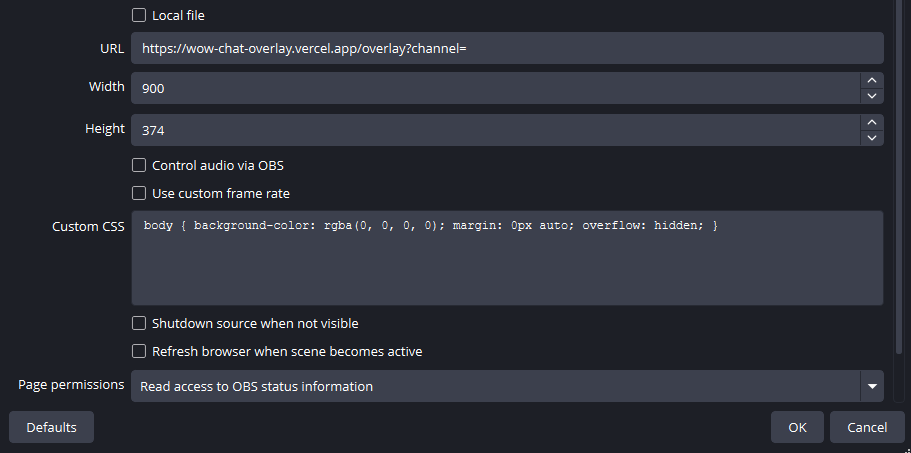
It needs a taller browser source too: Height in OBS has to follow, or the chat is cut off at the bottom. The number is next to your link.
Taken from the game's own files, so it reads like WoW. The chat itself is not translated.
Wording of the channels and tabs.
17px is the default, so it stays readable on a phone. Bigger text means fewer lines in the box; the count next to your link shows how many.
Only the text inside the window.
3Chat
Hides each message that many seconds after it arrived, so the chat disappears between messages.
0 keeps messages until they scroll off.
Each service loads your channel's emotes and its global set. Off, its
codes (like monkaS) stay plain text.
Kick channels only have 7TV. For YouTube, Streamer.bot brings the emotes along.
Twitch's, Kick's and YouTube's own emotes always work.
A raid (on Kick: a host) shows a Raid Warning with the name and the count, and the window flashes once.
Raids under the number are skipped: 5 keeps one-viewer raids out, 1 shows all. Untick it if you already run a raid alert.
New, gifted and renewed subs show as guild lines: a new sub joins the guild, a renewal comes online.
A gift names every recipient, one joining after another.
Names get a WoW class colour, derived from the chatter's name colour on Twitch or Kick. YouTube has no name colours, so the name itself decides.
Messages from these names are never shown: your own bot, a second account, anyone. Separate names with commas, up to 20. The line under the field shows what the link will hide.
Already hidden: Nightbot, StreamElements, Streamlabs, Moobot, Fossabot, Sery_Bot, WizeBot, SoundAlerts, Blerp, PotatBotat, Supibot, StreamDatabase, KofiStreamBot, StreamlootsBot, BotRixOficial, PretzelRocks, and Kick's BotRix, KickBot, Kicklet and LiveBot.
Your link for OBS
Every setting lives in the link itself, so after a change the new
link has to go into OBS again. This browser keeps the form for your
next visit.
Every setting lives in the link itself, so after a change the new link has to go into OBS again. This browser keeps the form for your next visit.
One file that runs on its own. The overlay with these settings built in, for the Local file option in OBS. It needs nothing from this site and never updates itself: new versions reach the link at once, the file only when you download it again.
Saved. In OBS, tick Local file in the browser source, pick the file, and set Width and Height as below.
 Support me on Ko-fi