HUDLab
All overlays

Pixel Chat overlay for pixel-art and retro streams

Your Twitch, Kick or YouTube chat in a crisp pixel font, made for pixel-art and retro games. Type your channel, play with the preview, copy the link. Free, nothing to install, no account.

Live Preview · sample messages, your settings Set your OBS source to px
Look
px
Name colours
Badges
Role colours

Drag the round handles: width 52 characters, height 7 lines. The top one moves in whole lines; pulled all the way out, either one reaches your stream's full height or width. Box puts the chat on one background, Cards gives every message its own. Background opacity 0% leaves only the text, 100% is solid black. Text steps in whole pixels. About 7 lines fit at this text size.

Chat what shows up, what stays out

sec0 keeps messages until they scroll off.
Third-party emotes
Raids
Subscriptions
Already hidden: 20 bots

Nightbot, StreamElements, Streamlabs, Moobot, Fossabot, Sery_Bot, WizeBot, SoundAlerts, Blerp, PotatBotat, Supibot, StreamDatabase, KofiStreamBot, StreamlootsBot, BotRixOficial, PretzelRocks, and Kick's BotRix, KickBot, Kicklet and LiveBot.
Chat rolesa colour for each, and the chatter's own badges

  • Someone raids youBob is raiding!
  • A new, gifted or renewed subBob just subscribed!

Role colours, the switch under the preview, writes each role's messages in its colour. Picking a colour here switches it on. If a chatter has several roles, the top one in the list wins. Roles in the same colour as Everyone else are skipped. Raids and subs are events, not roles, and keep theirs.

Each name keeps the colour its chatter picked; a name without one, and every YouTube name, gets one of Twitch's own, and one too dark to read on stream is lightened. With Name colours off a name is white, or its role's colour while Role colours is on.

Every chatter shows the badges Twitch shows, redrawn in pixels: streamer, moderator and VIP, your channel's own sub, bits and campaign badges, the gift badge, and the badges people earn at Twitch events. On Kick your channel's sub badges; a Kick or YouTube role without a picture of its own wears Twitch's, and a YouTube member your Twitch sub badge. Badges, under the preview, turns them off.

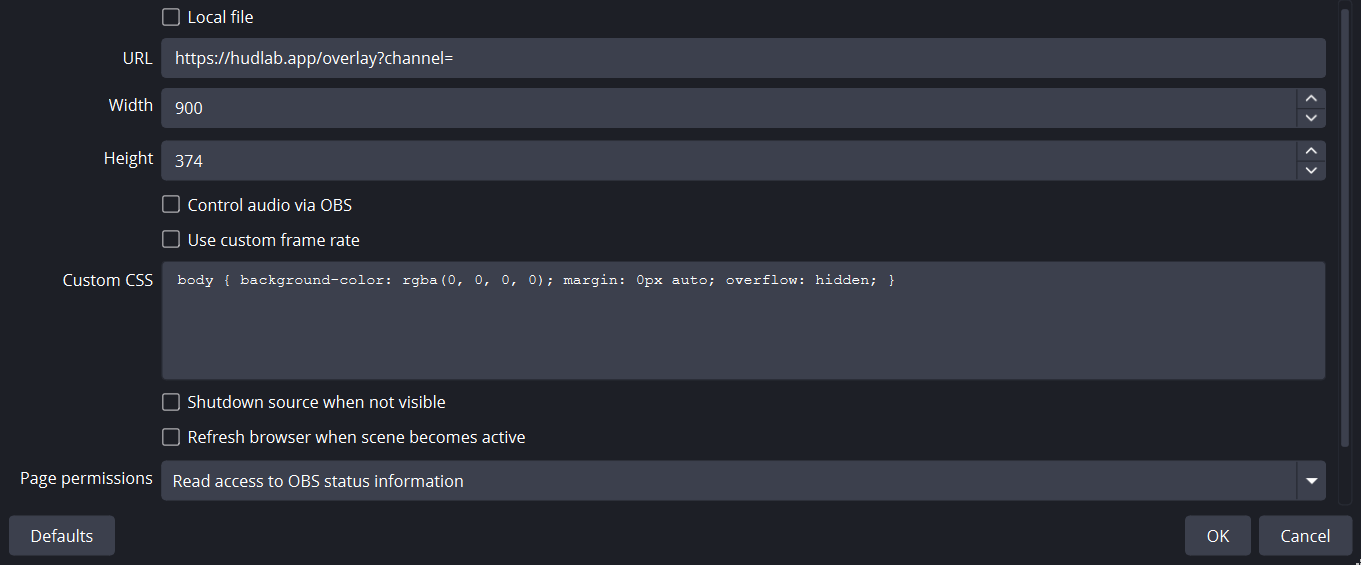
Add it to OBSthree fields

  1. Under Sources, click + → Browser → Create new.
  2. Paste the link into URL. Downloaded the file instead? Tick Local file and pick it.
  3. Set Width to 810 and Height to 316.
  4. OK, then drag the overlay where you want it. For another size change Text above instead of dragging a corner; resized in OBS anyway, right-click it, Scale Filtering → Point.
The OBS browser source properties window with URL, Width and Height filled in.
Only URL, Width and Height need touching. Your numbers are the ones above.

Aboutwhat this is, in short

A free chat overlay in a crisp pixel font, made for pixel-art and retro streams. It shows your Twitch, Kick or YouTube chat with every chatter in their own name colour and their own badges, on one box or with every message on a card of its own.

The font was drawn pixel by pixel for this overlay, so it stays sharp at whole sizes instead of blurring. It runs as a browser source in OBS or any other streaming app that can show a web page. Nothing to install, no account; every setting lives in the link, and the same page can build a single HTML file to keep on your PC.

Say hi

I make this overlay in my spare time. It runs inside other people's OBS, so I don't always see when something goes wrong. If something doesn't work, or you notice something missing, send me a message.

Discordstntmnmk Twitchstntmnmk

Have an overlay or stream tool of your own in mind? Maybe I can help build it.

Support

There's never any pressure. But if the overlay has found a place in your stream, your kindness genuinely means a lot to me, and every single tip is noticed.

Thank you, sincerely.

Support me on Ko-fi
Prefer crypto? You can send BTC, ETH or SOL directly.
  • Bitcoinbc1qnfs6xds8wrtcjd52k7nc3mgwpv6g3lcwvgp9at
  • Ethereum0xFDe817B5FB8Dd7171055d6A15BE5f6FF8F0C7242
  • SolanaGUsg1MWsfwJSxSZbA948P8PLiNwVbbCzBb1dYn3TJPZQ

Supporters

A big thank you to everyone who supports this project!